WordPress vs a visual builder: honest pros and cons
Plugins, updates and separate hosting, or a single design–publish flow? A comparison for freelancers and small businesses.
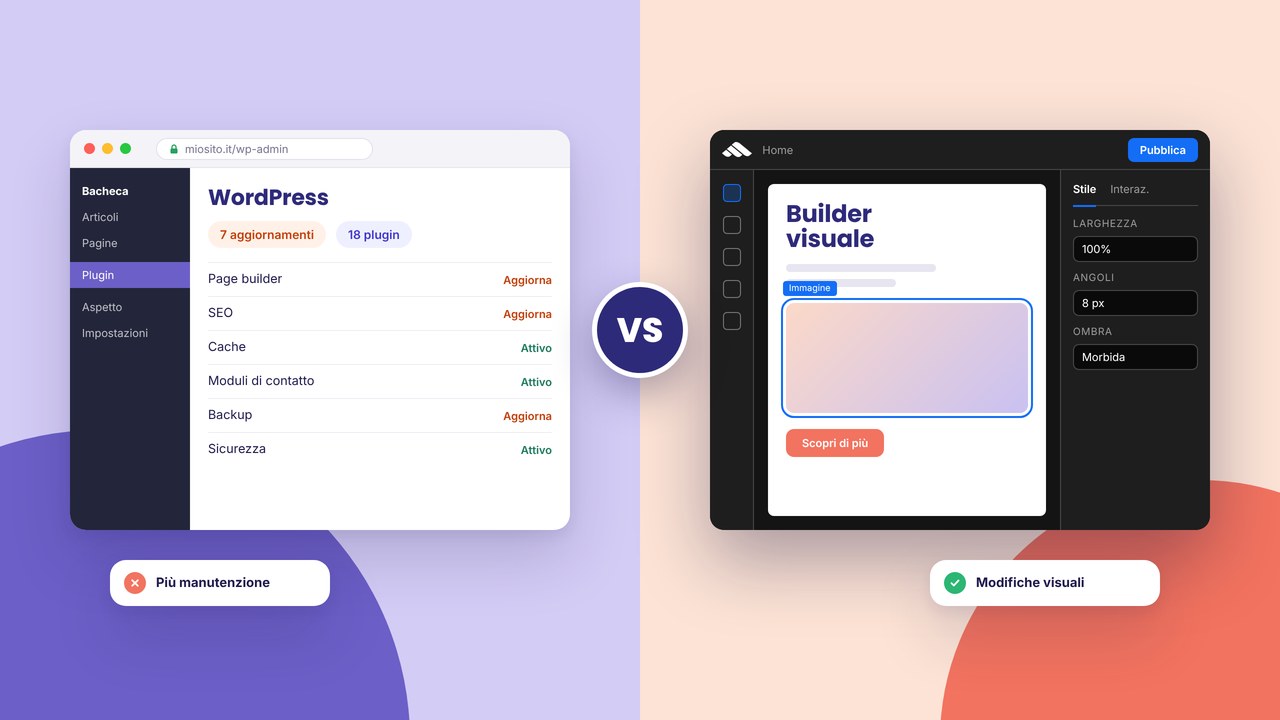
WordPress remains the de facto standard, but it is not the only path to a professional brochure website. A visual builder with integrated hosting changes maintenance, security and publishing speed. An honest comparison, without “WordPress is dead”.
WordPress: strengths
- A huge ecosystem (plugins, themes, community)
- A very mature blog if you manage complex articles
- Hosting anywhere — you are not tied to one platform
WordPress: hidden costs
- Core, theme and plugin updates — if you skip them, you risk vulnerabilities
- Conflicts between plugins that “step on each other”
- Performance to optimise (cache, images, scripts)
- Staging, backups, FTP: often on you or the agency
Martini builder: strengths
- Design, revisions and publish in the same environment
- No separate hosting panel to update HTML
- HTTPS and managed infrastructure — see security
- Per-page SEO meta without Yoast or similar
Builder: when to consider alternatives
Very custom e-commerce, marketplaces and portals with complex server logic may still need a dedicated stack. For portfolios, studios, SMEs and service landings the builder often covers 90% of cases.
A quick decision table
Choose WordPress if: you enjoy tinkering, you already have managed WP hosting, you need an indispensable niche plugin. Choose the builder if: you want to go live quickly, you often update the site yourself, you prefer a smaller attack surface and less maintenance.
Migration
From WordPress to a builder is not always automatic: content and structure are rebuilt, often with the benefit of a clean-up (fewer unused pages). Plan URLs and redirects if you change domain or slug.
Next steps: 2026 costs, publish in 10 steps, try the builder.
Go deeper: beyond WordPress and the builder
If the scope is broader (copy, UX, integrations), also compare builder vs a made-to-measure project and why a professional site is not just a template. For projects with a studio in Prato and clients in Tuscany: about and consulting.
Who updates the site? The decisive question
WordPress shines when there is a person (in-house or an agency) who manages updates, backups and plugins on a fixed schedule. The Martini builder is aimed at anyone who wants to change copy, images and sections visually and publish without FTP or a separate hosting panel. If the site sits untouched for months, both stacks work; if you touch it every week, operational friction weighs on the time budget.
For freelancers who deliver sites to “non-technical” clients, the builder reduces tickets of the “I can’t get into wp-admin” kind. For editorial teams with complex article workflows, nested categories and advanced SEO plugins, WordPress can remain the rational choice.
Security and attack surface
WordPress
Every plugin is extra code to patch. Outdated themes and weak credentials remain frequent causes of compromise. Cache, a WAF and managed WP hosting mitigate, but they do not remove the responsibility for maintenance.
Integrated builder
Fewer moving parts on your side: HTTPS and infrastructure are managed by the platform — more in security. A strong password, 2FA on the account and legal content (cookies, privacy) remain important, as in HTTPS and GDPR.
Perceived performance and Core Web Vitals
WordPress can be very fast with excellent hosting, optimised images and few scripts. It can also become slow with heavy page builders, sliders everywhere and ten plugins in the footer. In the builder the goal is a lean runtime for brochure sites; still avoid 4 MB heroes and excessive animations — see interactions without overdoing it and SEO mistakes.
SEO: basic parity, differences in the workflow
Both allow per-page meta tags, clean URLs and a sitemap. On WordPress, plugins such as Yoast add checklists; in the builder many checks are native in SEO optimisation. Ranking quality depends on content, internal links and local SEO, not on the CMS itself. For SMEs in Tuscany: local SEO.
Costs over time
WordPress: hosting, domain, any premium theme/plugins, hours of maintenance or an agency contract. Builder: a predictable subscription — the full picture in how much a site costs in 2026. Also compare pricing and integrated hosting.
Starting from a template in the builder lowers the initial design costs; WordPress offers thousands of free themes of very variable quality.
Practical scenarios
A photography studio, 6 pages, monthly portfolio updates: builder + components for project grids.
A small blog newsroom with multiple authors and categories: consider WordPress or a dedicated blog — guide a blog in the builder if the volume is moderate.
Redesigning an outdated site: when a redesign makes sense, redirects and the go-live checklist.
FAQ
Is WordPress “more professional” than the builder?
No: what counts is the result (design, copy, speed, conversions). WordPress is more flexible in plugin niches; the builder is more straightforward for brochure sites and frequent publishing.
Can I keep WordPress only for the blog and the rest on the builder?
Yes, but you manage two stacks, two hosting setups and split SEO — it is only worth it with strong editorial needs.
Exporting data if I change platform?
Always plan content and redirects. Migration is not a complete drag-and-drop; it is often a chance to simplify the architecture — page structure.
Does the builder replace enterprise WooCommerce?
For complex e-commerce, no. For a catalogue and quote requests, a brochure approach is often enough — an online product catalogue.
How do I try the builder without leaving WordPress straight away?
Sign up, clone the structure on a demo project, compare the time of a typical change (e.g. changing the hero + publish). Then decide.
A quick checklist before you decide
Write on a sheet: number of v1 pages, update frequency, who pays for hosting and maintenance, whether you need a heavy blog or a simple catalogue, the maximum yearly budget. If most of the answers point to simplicity and visual control, the builder deserves a serious test. If you are aiming at niche plugins or custom PHP integrations, WordPress stays in the running. In both cases, do not launch without the go-live checklist and without defining who writes titles and descriptions — common mistakes in brochure SEO.